
One App, 173 Tenants, No Passwords Needed


Somewhere in your company's Microsoft 365 account is a list of software that can read everything. This month showed what happens when one of them is stolen. Here is the question to ask your IT provider.
By Steve Copeland
On October 15, an attacker signed into 173 companies' Microsoft 365 accounts in about two and a half hours. Nobody at those companies was phished. No password was guessed. The attacker had one credential belonging to ConnectWise Cloud Backup, a service IT providers use to back up client email and files, and that credential was already trusted inside every company where the provider had installed it. Huntress, the security firm that caught it, said the attacker moved through the list of companies in alphabetical order a few seconds apart. A script was working down a list, and the list had your peers on it.
I have run IT companies for most of my working life, and ConnectWise is a vendor many of us built our businesses on. To their credit they disclosed it, shut the app off, and said they found no evidence client backup data was taken. I am not writing to pile on. I am writing because the thing the attacker inherited the moment they had that credential is sitting in your company's account right now, and the odds are that nobody, including the people you pay to manage it, can tell you what it is.
The Password Never Came Up
Every piece of software connected to your Microsoft 365 account got there the same way. At some point an administrator saw a screen that said this app wants to read your mail, your files, your Teams chats, and your user directory, and clicked Accept. A backup app has to read everything in order to back it up, so it asks for everything. Microsoft said the attacker simply used permissions customers had already granted, and in many cases that included the right to change the directory itself. Todyl, another security firm that investigated, put it plainly: signing every employee out would have done nothing, because the access never depended on an employee.
The attacker then did what a burglar does once inside. Huntress found that in at least one company, a second ConnectWise app promoted itself to Global Administrator and ran a script that planted new keys inside two other trusted tools, including a security product. Those new keys keep working after the original stolen credential is changed. It is the tenant who copies the master key and hands out two spares before you get around to changing the lock.
The uncomfortable part is this. Most companies have somewhere between a dozen and several dozen apps with this kind of access. Some were approved by an employee who left years ago. Some belong to vendors you no longer use. Each one is a credential that, if stolen, walks straight in.
The AI Part Is Speed
Six days later Microsoft attributed the campaign to Storm-0940, a China-aligned group, and said the group ran it on ARTEX, an open-source tool that chains AI agents together to carry out an intrusion from reconnaissance through data theft with almost no human involvement. Microsoft's numbers tell you what that means in practice. More than 2,250 companies targeted. Over 200 successful sign-ins in under four minutes. Multiple cases where the time from choosing a target to holding administrator-level access was under three hours. The agents do not sleep and they try several doors at once.
You may have seen this month called Black October, mostly because AI models found decades-old flaws in PHP, the language behind roughly 70% of websites, and every web team on earth spent a week patching. Chris Krebs, the former head of CISA, told CNBC that 3% of all critical vulnerabilities ever discovered were found in the last month. That is the headline story. The ConnectWise story got far less coverage and it is the one that applies to a 40-person law firm or a 12-location dental group, because those businesses are not running PHP. They are running Microsoft 365 with a stack of apps approved by people who are no longer there.
One caution Microsoft itself made, and that I want you to hold onto: the presence of an affected app, or even a successful sign-in, does not by itself mean your data was taken. Anyone who tells you otherwise without evidence is selling something.
The Question To Ask Your IT Provider This Week
I wrote a book called The 3AM Test, and the test is simple: when something breaks at 3 a.m., do you know who picks up the phone and what they already know about your business. This month's version of that test fits in one email.
Ask your provider for a list of every application with administrator-approved access to your Microsoft 365 account, what each one is allowed to read or change, the date it was approved, and whether anything has used it in the last 90 days.
A good provider sends it back within a few days, with dates, and with a short note on which ones they recommend removing. A provider who comes back with "everything looks fine" and no list has told you something too. Nobody is accusing anyone. Consent grants have been a blind spot for the whole industry, mine included. The point is that after October 15 it is no longer acceptable to not know.
I have watched this conversation happen in real rooms. Two partners at a law firm, one of whom handles the IT. The IT partner says "we haven't had an issue so far." The other partner looks at the list of apps with full mailbox access, several of them unrecognizable, and says "yet." That second partner is the one who runs the business.
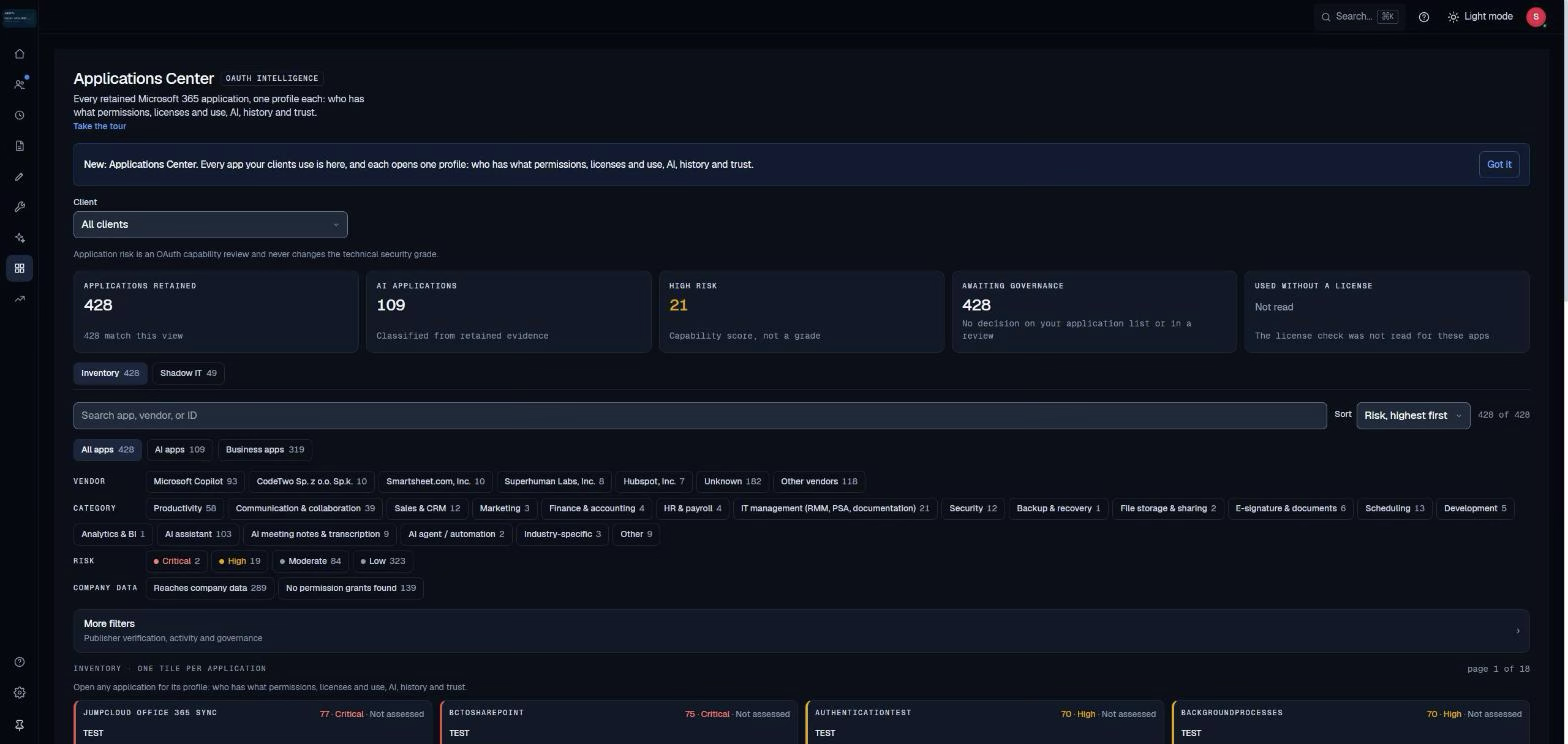
What a good answer looks like
I built SCOUTz because the IT providers I ran were bad at exactly this: showing a business owner evidence instead of a pitch. It is the tool a growing number of providers now use to answer the question above, so you may see its name on the report that comes back.
It works in two steps. First, a scan of what is publicly visible about your company, with every finding dated and explained in plain English. Second, with your written authorization, a read-only review of your Microsoft 365 account covering identities, settings, applications, permissions, and licenses. No software gets installed on your computers. It does not read the contents of anyone's email, files, chats, or AI prompts. It changes nothing. Your provider gets a list, you get a decision.
The application page is the one this month is about. It shows every connected app, what it can touch, when it was approved, and whether anything is actually using it. An app with full directory access that nothing has touched in a year stands out on its own. The same page covers AI tools employees have connected on their own, which matters more every quarter: IBM's 2026 Cost of a Data Breach report found unsanctioned AI involved in 43% of breached organizations, up from 20% the year before.
The part I insist on is restraint. Every finding carries its source, its date, how confident we are, and what we could not see. An app's presence is a reason to investigate, not a verdict, and the report says so in those words. That is the same line Microsoft drew in its ConnectWise guidance. It is also why the report is written for you, the owner, in business language, with a separate technical edition for the people who will do the work. You should never need an interpreter to understand what is connected to your own company.

What To Do This Week
Send the email. Ask for the list of apps with administrator-approved access, what each can touch, when it was approved, and whether it is in use. Put a date on it. If you use ConnectWise Cloud Backup through your provider, ask them to confirm the app is disabled until ConnectWise says otherwise and that they have checked for any new keys added to other apps since October 13. ConnectWise, Huntress, and Microsoft have published the exact steps and the links are below.
Stay proactive. The next ConnectWise may already be approved in someone’s account. Companies that know what’s connected will be better prepared.
IT providers can see how SCOUTz helps uncover these risks in a 30-minute demo at scoutzsecurity.io/demo or join the open beta at scoutzsecurity.io.

CEO Times Contributor
Covers business, innovation, and leadership, with a particular interest in entrepreneurs and emerging brands.
This article features partner, contributor, or branded content from a third party. Members of the CEO Times editorial staff were not involved in the creation of this content. All views and opinions are those of the contributor alone.